
By default every matching rule contributes its charge and evaluation continues to the next rule. The Mod column changes that flow. It is a Pro edition feature, and it is the advanced end of the plugin: most price lists never need it, and reaching for it too early makes a table harder to read. When you do need it, the Mod column has four settings and they cover everything.
The editor opens with the heading After this rule applied: and offers Pass, Drop, Stop, Deny, and Require. Pass is the default and means "carry on as usual" — no mod at all.
Mod Stop
Stop ends the evaluation at this rule. Its own charge counts, and no rule below it is looked at. That turns a table from "add everything that matches" into "first match wins", which is what people usually mean when they ask for rule priority.
Because Stop cares about order, the rule carrying it must sit above the rules it should override. Drag it to the top with the handle on the left of the row.
Example #1
Rules: orders $100.00 and over → free, with Stop; then any order → $8.00.
Cart: $120.
Result: the first rule matches and stops, so shipping is free.
Example #2
Cart: $60.
Result: the first rule does not match, the second one does, so shipping costs $8.00.
The same trick gives you "the highest applicable rate wins": put the rules in one table sorted from most expensive to cheapest and set Stop on each. Evaluation halts at the first one that matches, which is the most expensive of the matching set.
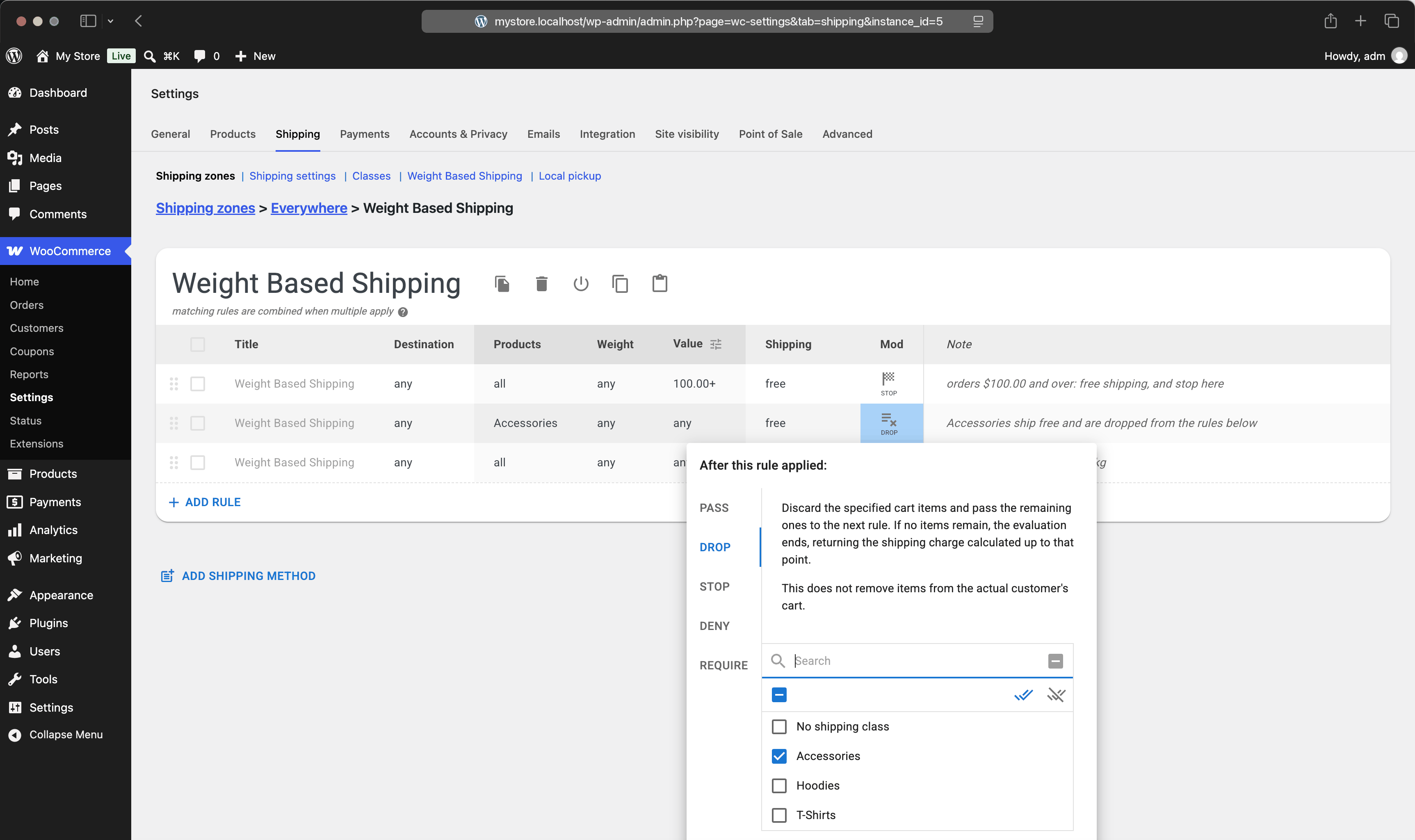
Mod Drop
Drop removes items from the evaluation after the rule has charged for them. The rule's own charge still applies; the items it covered are then hidden from every rule below, so a catch-all at the bottom of the table does not charge for them twice.
By default it drops exactly the items the rule matched — the ones chosen by its Products column. You can also give Drop its own selection of shipping classes, which then removes those items from play whether or not the rule charged for them. Nothing is removed from the customer's actual cart; this is bookkeeping inside the table.
Example #1
Rules: Accessories → free, with Drop; then any items → $1.00 every 1 kg.
Cart: a 0.3 kg pair of Sunglasses, which is an Accessory, and a 1 kg Hoodie.
Result: the accessories are charged nothing and dropped,
so the per-kg rule sees only the 1 kg hoodie and charges $1.00.
Example #2
Cart: two pairs of Sunglasses and nothing else.
Result: everything is dropped by the first rule,
evaluation ends with the charge so far, and shipping is free.
Dropping every item ends the evaluation, since there is nothing left to examine. That is the mechanism behind excluding products from free shipping and behind free shipping for specific products, where one qualifying item covers the order.
Mod Deny
Deny cancels the whole table. If the rule matches, the shipping method offers nothing at all — not a zero price, no option. The Shipping cell of such a rule shows a dash, because a denied method has no price.
Use it to refuse business you cannot fulfil: a hazardous class that must not travel abroad, or a weight above what your carrier accepts. Since WooCommerce requires the customer to pick a shipping option, denying every method for such an order prevents it from being placed. That is the point — but say so on the product page too, or the customer only finds out at checkout.
Mod Require
Require is the mirror image of Deny. A required rule that does match behaves normally. A required rule that does not match cancels the table. In other words: this method exists only for orders that satisfy this rule.
It is the clean way to gate an entire option on a condition. A refrigerated delivery method can carry a required rule for the Frozen class, so the option appears only when something frozen is in the cart — without that rule having to charge anything itself.
Example #1
Table: a rule for the Frozen class charging nothing, marked Require;
then a rule charging $12.00 for any items.
Cart with a frozen item: both rules apply.
Result: the option costs $12.00; without a frozen item the required rule fails
and the method is not offered.
Choosing between them
A short way to decide. If you want one rule to replace the rest, use Stop. If you want one rule to take some items out of the calculation, use Drop. If some orders must not be shipped by this method at all, use Deny. If this method only exists for certain orders, use Require.
And before any of them, check whether plain conditions will do: two rules with weight ranges 0–5 and 5–10 behave as alternatives without any mod at all.