
Everything the plugin does follows from one small model. A shipping method holds a table of rules; an order arrives; the table is read from top to bottom; the rules that match decide the price. Once that is clear, surprises stop — including the two that bring most people to support: why several rules produced one combined price, and why an option vanished entirely.
One table, one shipping option
A table of rules produces at most one shipping option at checkout. It is not one option per rule, and that is the most common wrong assumption: adding five rules does not give the customer five choices. The rules describe parts of a single price, and the customer sees the total under a single title. For Standard and Express side by side you add a second table — see Multiple shipping options.
How a rule is matched
Each rule carries up to four conditions: Destination, Products, Weight, and Value. A rule matches when all of its conditions are satisfied at the same time. A condition left at its default matches everything, so a rule with no conditions at all matches every order.
The order of evaluation inside a rule matters for one reason. Products is not a yes-or-no test: it selects which cart items the rule looks at. Weight and Value are then measured over those items only, not the whole cart. A rule that selects the Hoodies class and requires 2–5 kg is asking about the weight of the hoodies, not about the weight of the basket. Rule conditions covers each one in detail.
Matching rules are added up
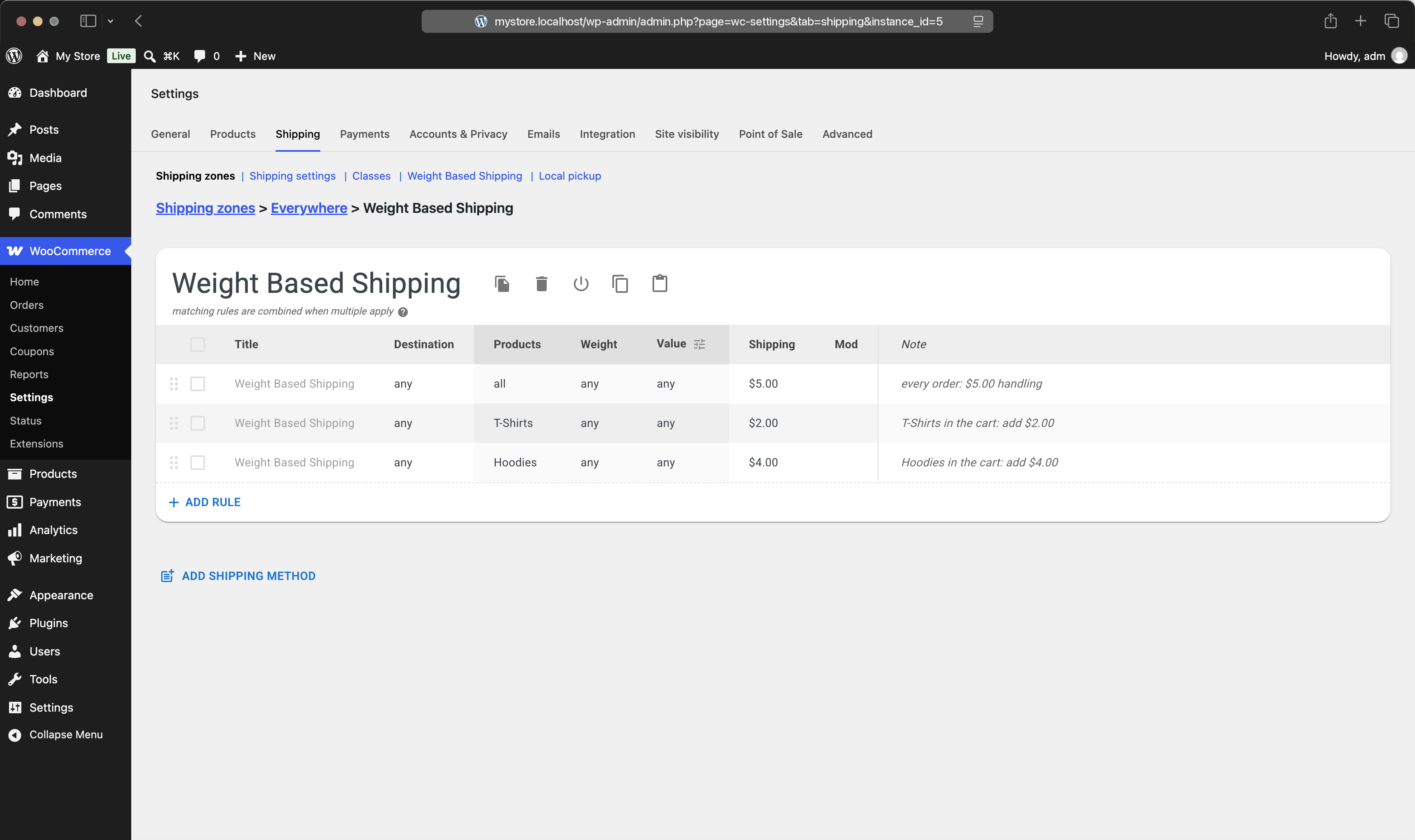
When several rules match the same order, their charges are summed into one price. There is no hidden priority, no "cheapest wins", no "first match wins". The editor states this under every table with more than one rule: matching rules are combined when multiple apply.
Example #1
Rules: up to 2 kg → $2.50; 2–5 kg → $3.75.
Cart: 1.4 kg.
Result: only the first rule matches, so shipping costs $2.50.
Example #2
Rules: any weight → $5.00 handling; T-Shirts → $2.00; Hoodies → $4.00.
Cart: one T-Shirt and one Hoodie.
Result: all three rules match, so shipping costs $5.00 + $2.00 + $4.00 = $11.00.
Summing is the right behaviour for mixed carts, where each rule contributes the cost of the part it covers, as in Rates by shipping class. It is the wrong behaviour when you meant the rules as alternatives. Two ways to get alternatives: give the rules conditions that cannot both be true — weight brackets of 0–2 and 2–5 never overlap — or, in the Pro edition, end a rule with the Stop mod so that later rules are not consulted. Mods explains that in full.
The title the customer sees
Each rule has an optional Title, and the table itself has a name. If every matching rule carries the same non-empty title, the customer sees that title. If the matching rules disagree — different titles, or one of them left blank — the option falls back to the table's name.
So the table name is the reliable label, and rule titles are for the cases where one specific rule should rename the whole option. A rule titled Bulky item surcharge that matches alongside your normal rate will not append its title; it will reset the option to the table's name.
When nothing matches
If no rule in the table matches the order, the table produces no shipping option. It does not produce a free one. The method disappears from checkout, and if it was the only method in the zone, the customer sees no shipping options available and cannot place the order.
This is the mechanism behind most support tickets, and it is almost always one of three things: a gap between weight brackets, a top bracket that ends below the actual cart weight, or products with no weight set. Cover the whole scale — brackets that share their boundaries, and a last rule with no upper limit — and the method always has something to say. No shipping options at checkout walks through the full diagnosis.
A worked walkthrough
Take a table with three rules, in this order: a $5.00 handling rule with no conditions, a rule for the T-Shirts class charging $2.00, and a rule for orders of $100.00 and over charging nothing.
Example #1
Cart: two T-Shirts, $36 total.
Matched: the handling rule and the T-Shirts rule.
Result: $5.00 + $2.00 = $7.00, shown under the table's name.
Example #2
Cart: two T-Shirts and a pair of Sunglasses, $126 total.
Matched: all three rules, the last one adding nothing.
Result: $7.00 — the free rule does not cancel the others, it only adds zero.
Example #2 is the classic free-shipping mistake. A rule that charges nothing does not make the order free; it contributes nothing to a sum. To make an order genuinely free you have to keep the paid rules from matching — by bounding their Value to under the threshold, or, in the Pro edition, by using Stop. The recipe Free shipping over an amount shows both shapes.