
Weight rules are only as good as the weights on your products. The plugin does not estimate, convert, or invent them: it adds up what WooCommerce reports for the items in the cart and compares that number with your ranges.
Where the weight comes from
Each product carries a weight at Product data → Shipping → Weight. The cart weight is the sum of every shippable item's weight multiplied by its quantity. Nothing is added for packaging, and nothing is rounded before the comparison.
Variable products hold a weight per variation. A variation with its own weight uses it; a variation that leaves the field empty falls back to the parent product's weight. Since size variations usually do weigh different amounts, filling only the parent is a common source of prices that are right for one size and wrong for another.
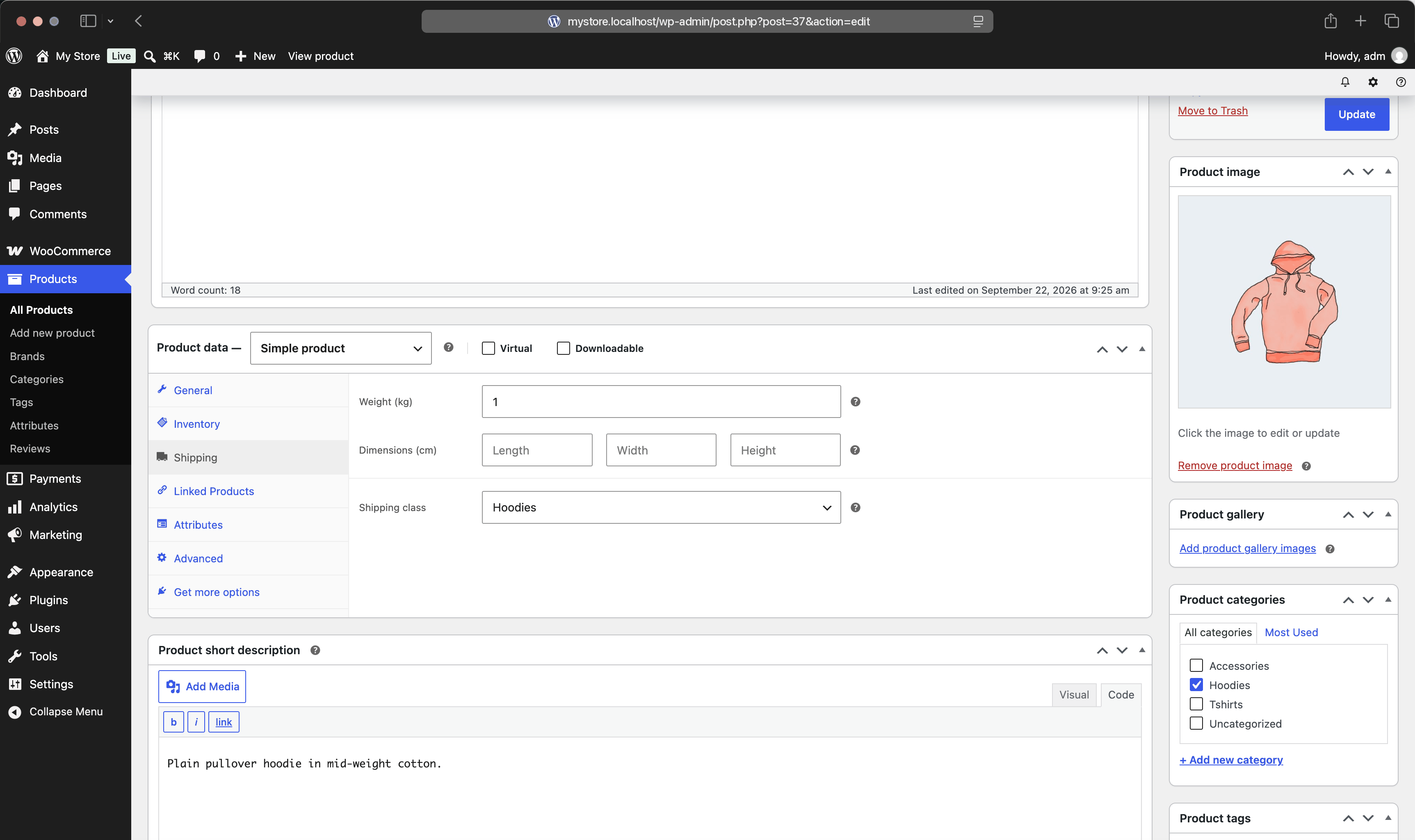
Products with no weight
An empty weight field is not an error and does not stop anything: it counts as zero. A cart full of weightless products weighs nothing, so a rule starting at any positive number cannot match it, and the method quietly offers no option.
This is the most frequent cause of "it works for some products but not others". Before blaming the rules, sort the products list by weight and look for the blanks, variations included.
If some products genuinely have no weight and should still ship, make sure a rule covers zero — a range starting at 0, or no weight condition at all. A rule with no weight condition matches a zero-weight cart and charges its flat part, which is the usual way to handle accessories and small items.
Virtual and downloadable products
Products marked virtual do not need shipping, and WooCommerce does not pass them to shipping methods at all. They never add weight, and a rule that selects shipping classes never sees them.
Their price is a different matter. For a rule that applies to the whole cart, the Value condition compares the WooCommerce cart subtotal, the figure the customer sees, and that includes virtual items. An order of one $80 e-book and one $30 t-shirt therefore reaches a $100 free-shipping threshold, even though only the t-shirt is being shipped. A threshold that ignored the e-book would advertise one number and apply another. A rule that narrows itself with the Products column compares only the selected items, so it counts the t-shirt alone.
A cart containing nothing but virtual products has no shipping at all — WooCommerce skips the whole shipping step, and no method is asked for a price.
The weight unit
There is one weight unit in the store, set at WooCommerce → Settings → Products → Weight unit, and everything speaks it: product weights, cart weight, and the numbers in your rules. The editor shows the unit next to the range fields so you can see which one is in force. Shipping by weight works in kilograms and Shipping per lb in pounds.
The plugin performs no conversion. This matters when you change the unit after building rules: switching the store from kilograms to grams does not rescale anything. A rule that read "up to 2 kg" now reads "up to 2 g", and matches almost nothing. If you change the unit, walk the tables and rewrite the numbers — and check product weights too, since those are stored as plain numbers as well.
Mixed units are the same trap in slow motion: a product entered as 1500 when the store is in kilograms weighs a tonne and a half. When a rule seems to match wildly wrong orders, compare the magnitude of your product weights with the store unit before anything else.
What is not measured
Only weight and value are measured — not box dimensions, not volumetric weight, and not the number of items. Packaging weight has no field of its own; if your carrier prices the gross parcel, shift the rule boundaries down by the weight of the box, so that a 0.15 kg box inside a 1–3 kg carrier bracket becomes a 0.85–2.85 kg rule.
Item counts can often be expressed in weight when a product line has a uniform weight: charging per 0.5 kg for a product that weighs 0.5 kg is charging per item. Quantity based shipping shows the technique and its limits, and Limits and workarounds lists the cases where another tool is the better fit.