
The Value condition compares money, and money has more than one meaning in a shop: with or without tax, before or after a coupon. Getting this wrong is why a free-shipping threshold sometimes triggers a little too late. This page says exactly which number the plugin compares, and how to change it.
What Value measures
Free shipping over an amount is the usual reason to reach for this column; what follows is what it compares.
Value is the price of the items the rule looks at. For an ordinary rule that is the cart subtotal. For a rule that narrows itself with the Products column, it is the subtotal of the selected items only — which is what makes "free shipping once you spend $50.00 on frozen goods" expressible.
Shipping is not part of it, and neither are fees added by other plugins. It is the merchandise total, as WooCommerce reports it.
Taxes and discounts
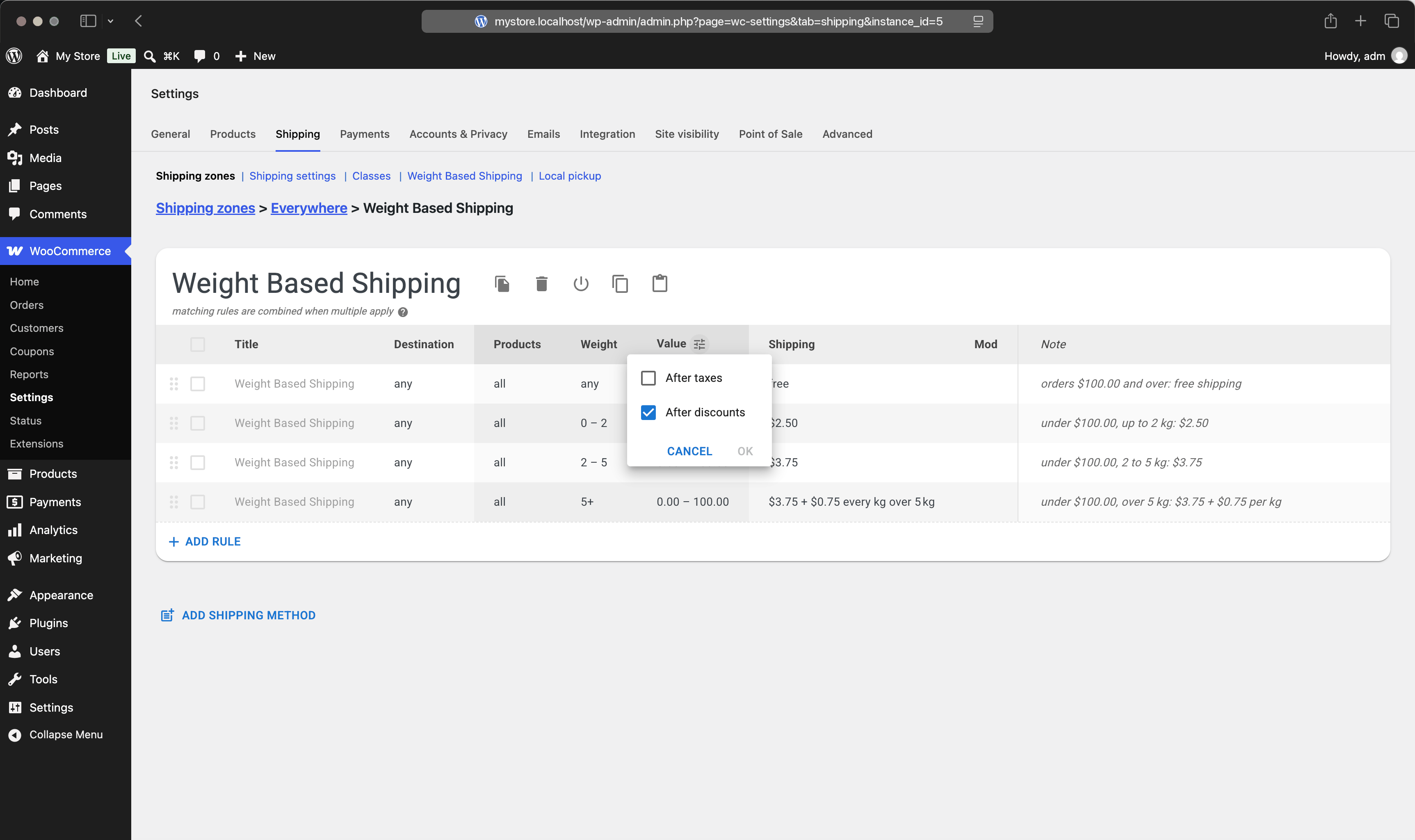
Two checkboxes decide how that total is calculated. They live behind the small settings icon in the Value column header, and they apply to the whole table rather than to a single rule.
After taxes is off by default, so the comparison uses the net subtotal. After discounts is on by default, so coupons are already subtracted.
Example #1
Store: prices displayed including 20% tax.
Cart: one item shown to the customer as $59.99.
Rule: free shipping for orders of $50.00 and over.
Result: the net subtotal is $49.99, so the rule does not match and shipping is charged.
Example #2
Same cart with After taxes switched on.
Result: the comparison uses $59.99, the rule matches, and shipping is free.
Neither setting is more correct than the other; what matters is that they agree with the number your customer sees on screen. If your prices are displayed with tax included, turn After taxes on so that thresholds mean what shoppers think they mean.
Because the settings are per table, a table with some rules written for gross prices and others for net cannot exist. When a threshold seems to work intermittently, check that you have not built two tables with different settings and similar rules.
Coupons
With After discounts on, a coupon lowers the number the rules compare. An order of $100 with a $20 coupon is $80 to the rules, and a $100 free-shipping threshold no longer applies. That is usually intended: the customer has spent $80.
The plugin does not read every discount, though. It does not read WooCommerce's own "free shipping" coupon type — that coupon drives WooCommerce's built-in Free Shipping method, which is separate. And a discount applied by a plugin that bypasses the standard WooCommerce discount API will not be visible here at all, so the rules keep seeing the undiscounted subtotal.
A full-value coupon brings the subtotal to zero. A rule whose range starts above zero then stops matching, so a fully discounted order can lose its shipping options unless a rule covers zero.
Tax on the shipping cost
Whether the shipping charge itself is taxed is a WooCommerce decision, not a rule setting. Rates produced by the plugin are taxable, and WooCommerce applies tax to them when the matching tax rate has its Shipping column ticked at WooCommerce → Settings → Tax → Standard rates.
If shipping tax is missing, test with a plain Flat Rate method: if Flat Rate is untaxed too, the tax settings are the cause. If you want no tax on shipping at all, switch it off in those tax settings.
Shipping prices are entered without tax. WooCommerce works with net shipping rates and adds tax on top, for its own methods as much as for this one, so there is no tax-inclusive field to fill in. To land on a specific gross price, enter the net equivalent — $3.99 including 10% tax is $3.6273 before tax.
One rounding detail can cost a cent: WooCommerce rounds the net shipping price before adding tax to it. Raising Number of decimals in WooCommerce → Settings → General gives the arithmetic more room when that matters.
Currency
Rules are written in the store's own currency, with the symbol and decimals taken from your WooCommerce settings.
In a multi-currency store, the Pro edition converts the bounds of Value ranges into the currency the customer is browsing in, so a $100 threshold stays the same threshold for a shopper paying in euros. It works with the common currency switchers, detected automatically. The charges themselves are converted by the currency plugin, as it does for product prices.
Without Pro there is no conversion: Value bounds are compared against whatever number the currency plugin reports, which is usually the converted price, so thresholds drift with the exchange rate.